How to Create Viral Funny AI Parrot Videos With Google Flow – Full Prompt Included
Funny AI animal videos are becoming more realistic every day, and one of the most entertaining formats right now is the Funny AI Parrot Video.
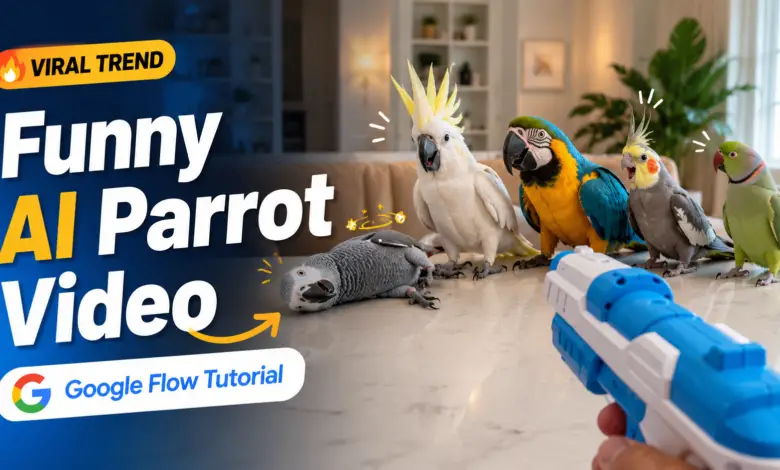
You may have already seen these videos on Instagram Reels, YouTube Shorts, Facebook Reels or other social platforms. Several colorful parrots sit together naturally while a person holds a harmless plastic toy gun in front of them. The toy makes a small click or pop sound, and each parrot gives an exaggerated dramatic reaction before falling over as if it is performing in a comedy scene.
The funniest part is the acting.
One parrot may dramatically spread its wings, another may lose balance slowly, while another may instantly fall over. When the movements, feathers, lighting, camera shake and sound are generated realistically, the final clip can look surprisingly similar to an actual smartphone video.
In this tutorial, I will show you how you can create this type of viral Funny AI Parrot Video using Google Flow, along with a ready-to-copy prompt.
What Is a Funny AI Parrot Video?
A Funny AI Parrot Video is an AI-generated short video in which realistic parrots perform human-like or exaggerated comedic actions.
The current play-dead style usually follows a very simple structure:
Four parrots are sitting together.
A human hand appears in the foreground holding a harmless plastic toy gun.
The toy is pointed toward the first parrot and makes a small plastic click or pop.
The first parrot reacts dramatically and falls over.
The toy then moves toward the second, third and fourth parrots, with every bird performing its own funny reaction.
Because the entire clip looks like casual smartphone footage instead of a highly polished CGI animation, the result can feel much more believable.
That combination of realistic animals + simple comedy + unexpected reactions is what makes this format interesting for short-form content.
What Is Google Flow?
Google Flow is Google’s AI creative studio for generating and editing images and videos using advanced generative models.
For video generation, Flow includes Google’s Veo technology, which can interpret detailed text prompts describing:
- Characters
- Animals
- Camera angles
- Actions
- Timing
- Environment
- Lighting
- Physical movement
- Sound effects
- Ambient audio
- Visual style
This makes Google Flow useful for videos where several different actions need to happen inside one carefully planned sequence.
For our Funny AI Parrot Video, we do not simply ask:
“Create four parrots falling down.”
Instead, we tell the AI exactly how many parrots should exist, what each bird should do, how the toy should move, what sound should occur and what must remain consistent throughout the video.
Why Detailed Prompts Matter for AI Parrot Videos
AI video generators can create impressive visuals, but complicated scenes can easily introduce mistakes.
For example, an AI model may:
- Suddenly create an extra parrot
- Remove one of the birds
- Change a bird’s color midway
- Duplicate an animal
- Make a fallen parrot stand up again
- Point the toy in the wrong direction
- Generate unrealistic movements
- Create a real firearm instead of a toy
- Add unnecessary cuts
- Change the environment during the shot
That is why the prompt used in this tutorial contains specific rules.
The goal is to maintain exactly four unique parrots from beginning to end while keeping the entire video as one continuous smartphone-style shot.
The Viral Four-Parrot Concept
The video is designed as a 10-second vertical 9:16 video.
There are exactly four parrots.
Each parrot has its own permanent appearance and identity.
The toy moves from:
Parrot 1 → Parrot 2 → Parrot 3 → Parrot 4
Each bird receives one harmless toy-gun click/pop sound.
Each bird performs one dramatic reaction.
Once a parrot falls down, it remains visible and does not stand back up.
At the end of the video, all four original parrots remain visible in the scene.
This simple timing structure gives the AI a clear sequence to follow.
Make Every AI Parrot Video Look Different
Another important part of the prompt is randomization.
You do not necessarily want every generated video to contain the same four green parrots sitting on the same sofa.
Instead, the AI can randomly choose realistic species such as parrots, macaws or cockatoos and change their:
- Feather colors
- Body size
- Face appearance
- Beak shape
- Crest
- Feather patterns
- Body proportions
The environment can also change.
One generation might happen in a living room.
Another could take place on a balcony.
Another might use a wooden table, sofa, carpet, patio, indoor bird room or garden seating area.
This allows the same basic comedy format to produce many visually different videos.
Why Smartphone-Style Footage Works Better
For this type of content, an overly cinematic camera can sometimes make the video look obviously artificial.
The prompt therefore asks for realistic handheld smartphone footage.
That includes:
- Slight natural camera shake
- Normal autofocus behaviour
- Realistic motion blur
- Natural exposure
- Everyday lighting
- Believable environmental sound
Instead of looking like a movie scene, the clip should feel like someone simply pulled out a smartphone and captured a funny moment.
That casual appearance is particularly suitable for Reels and Shorts.
Sound Is Extremely Important
Visual quality is only half of this concept.
The sound also sells the joke.
The video can include normal environmental ambience, subtle parrot chirps, surprised squawks, feather movement and soft landing sounds.
Most importantly, the toy should produce a clearly artificial plastic click/pop.
It should not sound like an actual firearm.
The prompt uses exactly four toy sounds — one corresponding to each of the four parrots.
No background music or narration is required because natural ambient sound helps maintain the realistic smartphone-video effect.
Copy the Google Flow Funny AI Parrot Prompt
Below this section you can use the Copy Prompt box to copy the complete Google Flow prompt.
The prompt has been designed around several important rules:
Exactly four parrots
One continuous 10-second shot
9:16 vertical format
Four sequential reactions
No duplicate birds
No disappearing parrots
No scene cuts
No real firearm
Only a harmless plastic toy
You can paste the prompt directly into Google Flow and generate your own variation.
How to Create the Video in Google Flow
First, open Google Flow on the web or on your Android device.
Start a new video generation.
Use a vertical 9:16 format if the option is available.
Paste the complete Funny AI Parrot prompt.
Generate the video.
After the generation is complete, check whether:
- Exactly four parrots appear.
- Their identities remain consistent.
- The toy moves toward each bird separately.
- Each parrot reacts only once.
- Fallen parrots remain down.
- No extra animal suddenly appears.
- The video remains one continuous shot.
- The sound resembles a harmless plastic toy.
AI video generation can vary between attempts, so you may need to generate more than one version before getting the best result.
Create Multiple Viral Variations
One advantage of this prompt is that the core comedy stays the same while the visual appearance changes.
For example, one generation could use:
Four colorful macaws on a wooden bench
Another could use:
Cockatoos sitting on a sofa
Another could show:
Different parrots inside a bright living room
Another could use:
A balcony with natural daylight
This helps creators make several videos from the same concept without every upload appearing identical.
You can also experiment with different reactions.
One bird might dramatically spread its wings.
Another might slowly lean sideways.
Another might briefly squawk before falling.
The important thing is to keep the scene playful and clearly fictional.
🦜 Google Flow Funny AI Parrot Video Prompt
Copy this complete prompt and paste it into Google Flow to create a realistic funny AI parrot video.
Google Flow App for Android
Google also provides the Google Flow app for Android.
The mobile version allows creators to work with image and video generations directly from a smartphone, making it useful when you want to experiment without sitting at a desktop computer.
You can use the Google Flow button provided below this article to open the official app page on Google Play.
Ideas for More Funny AI Parrot Videos
Once you understand how structured prompts work, the same characters can be used for many other comedy concepts.
For example:
Parrot Freeze Challenge
All parrots suddenly freeze at exactly the same time and slowly look toward the camera.
Parrot Meeting
Four parrots appear to be having a serious private meeting until somebody enters the room.
Dramatic Parrot Reaction
One parrot does something unexpected and the remaining birds give exaggerated reactions.
Parrot Dance
Several different parrots bob their heads and move naturally in a funny synchronized pattern.
Confused Parrot
Three parrots react to something immediately while the fourth bird keeps looking around as if it has no idea what happened.
The main idea is to give the AI a simple visual joke with a clear beginning, action and payoff.
Tips for Better Google Flow AI Parrot Videos
Do not overload the video with too many different actions.
Short AI videos usually work better when one clear idea is executed properly.
Keep the number of parrots fixed.
Describe their identity consistency.
Specify exactly when actions should happen.
Mention realistic feathers and anatomy.
Use believable gravity and movement.
Keep the camera relatively simple.
Use natural environmental lighting.
Generate several variations and keep the strongest one.
For viral-style videos, the concept should be understandable almost immediately — even before the viewer hears the audio.
Google Flow AI
Create and experiment with AI-generated images and videos directly from your Android device using Google Flow.
▶ Get Google Flow on Google PlayOpens the official Google Play Store listing
Can You Make These Videos Without Filming Real Parrots?
Yes.
That is one of the biggest advantages of this workflow.
The entire visual can be generated with AI, meaning no real bird needs to perform the exaggerated falling routine and no real weapon is involved.
The toy-gun element described in the prompt is specifically a harmless plastic prop used as part of a fictional comedy scenario.
This makes it possible to experiment with unusual visual ideas entirely as AI-generated entertainment.
Final Thoughts
Funny AI Parrot Videos are a great example of how quickly AI video generation is changing short-form content.
A simple concept involving four realistic parrots, natural smartphone footage and carefully timed comedy can now be created through a detailed text prompt.
Google Flow makes it possible to control much more than just the appearance of the scene.
You can describe the timing, camera, animal behaviour, sound effects, environment and continuity rules.
If you want to experiment with the trend yourself, copy the full prompt below, open Google Flow and generate a few different versions.
The first generation may not always be perfect, but once the model follows the four-parrot sequence correctly, the results can be extremely funny and surprisingly realistic.
Try creating your own Funny AI Parrot Video with Google Flow and see what variation the AI gives you.