Google Flow AI Video Generator: Create Realistic Viral AI Videos With This Ready-to-Use Prompt

Google Flow AI Video Generator: Create Realistic Viral AI Videos With This Ready-to-Use Prompt
AI video generation has reached a point where creators can produce surprisingly realistic cinematic scenes using nothing more than a detailed text prompt. One of the most interesting tools for this is Google Flow, an AI-powered creative platform from Google designed for generating and experimenting with cinematic AI videos.
In this article, I am sharing a Google Flow video experiment I created along with the exact prompt used to generate it.
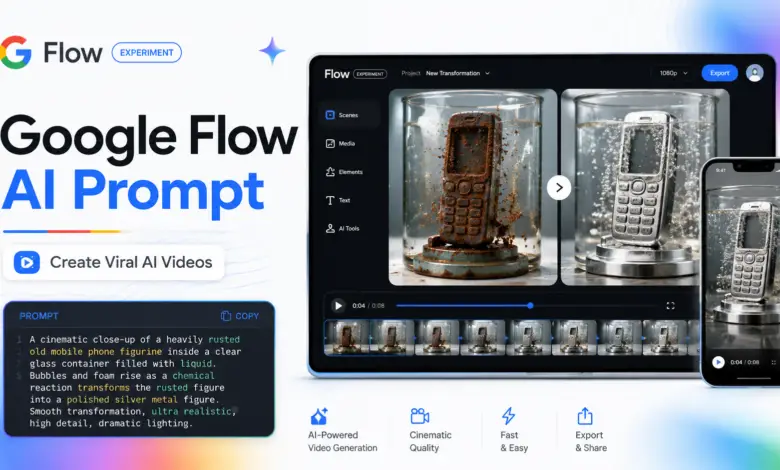
The concept is simple but visually satisfying: a heavily rusted object is placed inside a transparent glass container, liquid is poured over it, a chemical-style reaction begins, and the old corroded surface gradually disappears to reveal a clean, polished metallic object underneath.
You can also copy the prompt from this article and replace the object name with almost anything you want.
What Is Google Flow?
Google Flow is an AI-powered video creation platform designed to help creators turn ideas and written prompts into cinematic visual scenes.
Instead of manually creating every element of a video, users can describe the subject, environment, camera angle, movement, lighting, visual style and action they want to see.
The AI then attempts to generate a complete video based on those instructions.
For creators, this opens up many possibilities, including:
- Cinematic AI videos
- Product-style videos
- Short-form vertical content
- AI ASMR videos
- Visual experiments
- Science-fiction scenes
- Transformation videos
- Concept videos
- Social media Reels and Shorts
The quality of the final output depends heavily on how clearly the prompt explains what should happen in the scene.
The AI Video I Created With Google Flow
For this experiment, I wanted to create a satisfying macro video that looks like an old rusted object is being chemically restored.
The video begins with a heavily corroded object standing upright inside a transparent glass container.
A clear liquid starts pouring into the glass.
As the liquid level rises and completely covers the object, a strong visual reaction begins.
White bubbles and foam start forming around the surface while pieces of rust gradually separate from the object and float into the liquid.
Once the reaction settles, the original dirty and rusted surface disappears, revealing a smooth, polished silver-metal finish underneath.
The goal was to make the video feel like a combination of:
macro photography + slow motion + restoration video + satisfying ASMR visual.
Exact Google Flow Prompt
Here is the exact prompt used for the experiment:
Macro, eye-level cinematic shot, 9:16 vertical video. A detailed, heavily corroded bronze figurine of [nokia phone] stands upright in an empty clear glass container, entirely coated in thick, dark-brown flaky rust. Clear acid liquid is steadily poured from above, filling the glass to submerge the figure. As the liquid level reaches the top, the stream stops, and an intense chemical reaction begins: dense white foam and bubbles cling to the surface, and large flakes of dark-orange rust peel off, floating into the liquid. As the bubbling reaction subsides and the liquid settles, the rust is fully stripped away, revealing a pristine, smooth, polished silver metal statue underneath. Photorealistic liquid physics, ASMR macro focus, realistic chemical etching, high frame rate slow-motion.
You can copy this prompt and use it as a starting point for your own Google Flow experiments.
The Most Important Part of the Prompt
You may have noticed this section:
[nokia phone]
This is the part you can change.
You do not have to generate a Nokia phone every time.
Simply replace the text inside the brackets with a different object.
For example:
[vintage camera]
[old gaming console]
[robot figurine]
[sports car model]
[antique clock]
[metal skull]
[classic motorcycle]
[retro computer]
The rest of the prompt can remain mostly unchanged.
This makes the prompt reusable and allows you to create many different videos using the same visual concept.
📋 Google Flow AI Video Prompt
Copy this prompt and customize the object name to create your own version.
Why This Prompt Produces Better Results
A common mistake with AI video generators is writing prompts that are too short.
For example:
Create a video of rust disappearing from an old phone.
The AI understands the basic idea, but it receives very little information about how the video should actually look.
The prompt used in this experiment provides much more detail.
It explains the:
- Camera angle
- Video orientation
- Object appearance
- Rust texture
- Glass container
- Liquid movement
- Chemical-style reaction
- Foam and bubbles
- Rust particles
- Final transformation
- Lighting style
- Macro photography look
- Slow-motion effect
- Desired realism
Giving the AI this additional visual information can make the result much more controlled and cinematic.
Why “Macro” Matters
One of the most important words in this prompt is macro.
Macro-style shots allow the viewer to see extremely small details.
In this type of video, those details are important because the visual satisfaction comes from seeing:
- tiny bubbles forming,
- rust flakes separating,
- liquid moving around the object,
- surface textures changing,
- and polished metal gradually appearing.
Without the macro-camera instruction, the AI may generate the scene from too far away, reducing the impact of the transformation.
Why 9:16 Vertical Format Is Useful
The prompt specifically asks for:
9:16 vertical video
This format is ideal for modern short-form platforms such as:
- YouTube Shorts
- Instagram Reels
- Facebook Reels
- TikTok
Vertical videos fill most of the mobile screen, making them particularly useful for visually satisfying AI content.
If you are creating content primarily for YouTube videos or desktop viewing, you can experiment with a wider cinematic format such as 16:9 instead.
You Can Turn One Prompt Into an Entire Video Series
One of the most useful things about AI video prompts is that a successful concept does not have to be used only once.
The same basic prompt structure can become an entire content series.
For example:
Episode 1: Rusted Nokia Phone Restoration
Episode 2: Rusted Camera Restoration
Episode 3: Rusted Gaming Console Restoration
Episode 4: Rusted Robot Transformation
Episode 5: Rusted Sports Car Model Restoration
The camera style, liquid reaction and transformation can remain similar while the main object changes.
This allows creators to build a recognizable visual series instead of creating a completely new concept every time.
Experiment With Different Materials
You can also modify the material revealed at the end.
The original prompt reveals:
polished silver metal
But you can experiment with other materials.
For example:
- polished gold
- chrome metal
- mirror-finish steel
- copper
- titanium
- black metallic finish
- brushed aluminium
A simple change to the final material can completely change the visual mood of the video.
Experiment With Different Camera Styles
The camera instructions can also be changed.
Instead of an eye-level macro shot, you could try:
Extreme close-up macro shot
for more detailed bubbles and surface textures.
Or:
Slow cinematic orbit around the object
to create a more dramatic three-dimensional scene.
Another option could be:
Locked tripod macro shot
for a cleaner ASMR-style composition.
Small changes to camera instructions often produce completely different results.
AI Video Generation Requires Experimentation
Even with a detailed prompt, AI video generation is not always identical from one generation to another.
One result may have excellent liquid physics but weaker rust removal.
Another generation may create a better transformation but slightly different camera framing.
Because of this, it is usually worth generating multiple versions of the same prompt.
You can then choose the version with the best:
- object consistency,
- liquid movement,
- transformation,
- camera composition,
- realism,
- and overall cinematic quality.
Instead of rewriting the complete prompt after one imperfect result, try several generations first.
Google Flow for Content Creators
Tools like Google Flow can be especially useful for creators because certain scenes would normally require expensive equipment, complicated visual effects or physical setups.
AI generation makes it possible to experiment with concepts before investing significant time or money into production.
A creator could use Flow for:
- cinematic concepts,
- storytelling,
- product visualizations,
- fictional environments,
- social media videos,
- AI experiments,
- advertisements,
- Shorts and Reels,
- concept trailers,
- and creative visual effects.
The most important skill is increasingly becoming the ability to describe a scene clearly.
📱 Google Flow App
Create and experiment with AI-generated videos directly from your Android device. Open the official Google Flow app on Google Play.
▶ Get Google Flow on Google PlayOpens the Google Play Store
Try the Prompt Yourself
If you want to experiment with this concept, copy the prompt shared above and change [nokia phone] to an object of your choice.
Start with one simple change rather than rewriting the entire prompt.
For example, change:
[nokia phone]
to:
[vintage camera]
Generate the video and observe how the AI interprets the new object while keeping the same rust-removal transformation.
Once you find a result you like, you can begin modifying the camera movement, materials, lighting and environment.
Google Flow on Web and Android
Google Flow can be accessed through Google’s Flow experience on the web, and Google also provides a mobile experience for Android users.
Mobile access can be especially useful for creators who want to experiment with AI content directly from their smartphone, while the web experience may be more convenient when working on larger creative projects.
Whether you are experimenting casually or building content for a social media channel, the important part is developing reusable prompts that consistently communicate your visual idea.
Final Thoughts
Google Flow demonstrates how quickly AI video generation is evolving.
A scene that once required props, liquids, macro cameras, lighting, editing, slow-motion recording and visual effects can now be explored through a carefully written prompt.
The rust-removal video in this article is just one example.
By keeping the core prompt and changing the object, material, camera angle or environment, you can create dozens of completely different variations from the same basic idea.
If you are experimenting with Google Flow, try the prompt above, replace [nokia phone] with your own object and see what kind of result you can create.
And remember: the chemical reaction shown in this AI-generated concept is intended as a visual effect and creative experiment, not as real-world chemical-cleaning guidance.